
Kids Activity Ideas
Dev VisionsParenting
4.21.00 Reviews
- Version
- 1.2.1
- Installs
- 10.00K
- Age Rating
- Everyone
Screenshots
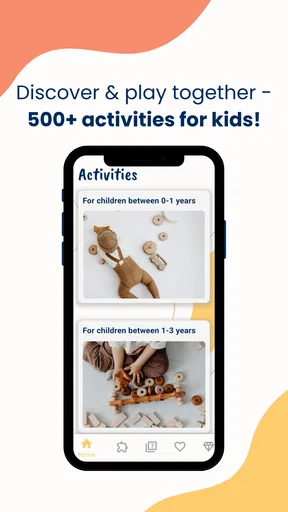
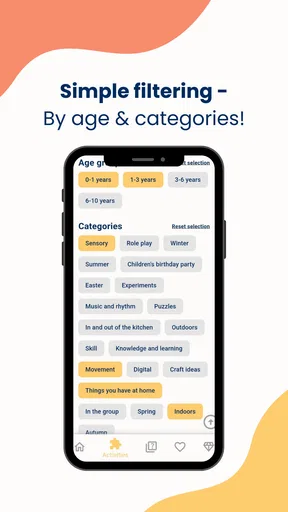
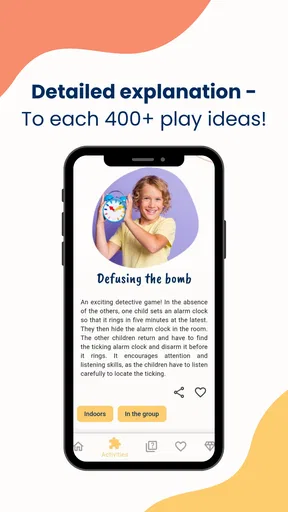
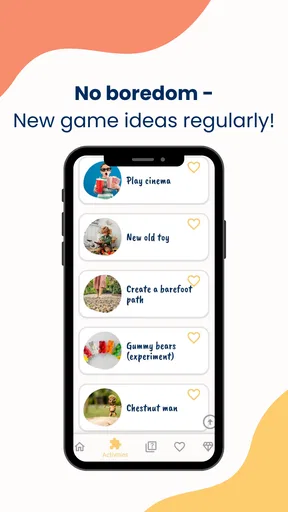



Our Review of Kids Activity Ideas
 Analysis by Appyee
When a child says “I’m bored” for the third time before lunch, the hardest part is often not finding an activity but thinking of one that fits the available time, space, age, and energy level. Kids Activity Ideas, a free parenting app from Dev Visions, is designed for that exact moment. I tried it as a practical source of ideas rather than as something to browse endlessly, and my first impression was simple: it can turn a blank afternoon into a workable plan quickly.
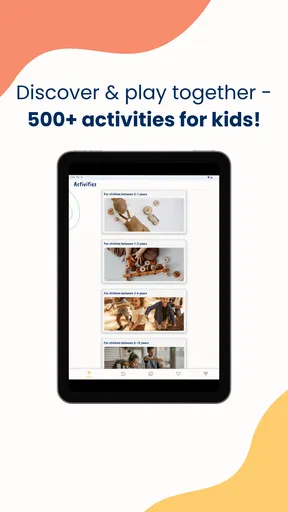
The app is aimed at children from birth through age ten, which gives it a broad family role. That range is useful if you have children at different stages, but it also means you need to judge suggestions carefully instead of assuming every idea suits every child. Its store summary points to more than 500 play ideas and activities, and the appeal comes from having that variety gathered in one place rather than scattered across searches, saved posts, and forgotten screenshots.
My more important question, however, was whether it would still deserve a place on my phone after the first burst of curiosity. Activity apps often feel helpful for a few days, then become another icon that parents ignore. In my experience, this one has a chance of lasting because it addresses a recurring household problem, but its long-term value depends on how deliberately you use it.
What the first week feels like
The first week is where Kids Activity Ideas makes its strongest impression. Opening an app full of suggestions is much easier than starting with a blank search box and trying to invent the right wording. I could move from “something for a quiet morning” to “something that gets energy out” in my head without needing a complicated plan. The benefit is not that every suggestion will be perfect; it is that the app reduces the mental effort required to begin.
That matters most during ordinary parenting moments. Imagine a rainy Saturday when one child is restless, another is too young for a structured craft, and you have only a short window before lunch. Instead of presenting the children with a large, vague instruction to “go play,” I would choose one idea, gather only the materials already available, and give it a clear stopping point. The app works best as a prompt for that decision, not as a replacement for the parent’s judgement.
Because the age range is so wide, I would not hand the phone to a child and expect the app to plan the session independently. A suggestion suitable for a baby may be sensory and closely supervised, while an activity for an older child may invite more independence. The useful workflow is for an adult to scan first, remove anything unsuitable for the child’s abilities or surroundings, and then present the idea in simple language.
During the first few uses, the number of possibilities can feel exciting. I found myself thinking about different ways to fill small gaps in the day: a transition after school, a low-key activity before bedtime, or something to do while dinner is being prepared. That flexibility is more valuable than a single impressive project because family routines rarely provide a perfect block of free time.
Still, novelty can disguise friction. An activity sounds appealing in a short description, but the real test is whether it can be started without a long hunt for supplies or a complicated explanation. Parents should read each suggestion with a practical filter: What do I need right now? How much cleanup will follow? Can my child do this safely? If the answer to those questions is inconvenient, another idea may be better even if it looks more creative.
Turning suggestions into usable plans
My most useful first-week habit was to choose activities by purpose rather than by how entertaining they sounded. I separated ideas mentally into three groups: activities that help a child move, activities that encourage concentration, and activities that make a short waiting period easier. This approach prevents endless scrolling and makes the app more responsive to what is happening in the home.
A second helpful habit is to adapt the same suggestion instead of treating it as a fixed instruction. For a younger child, I might simplify the steps and stay close. For an older child, I might let them choose the materials or change the rules. This makes the broad age coverage more practical. The app supplies a starting point; the adult supplies the appropriate level of challenge.
The real first-week advantage is reduced decision fatigue, not unlimited entertainment. That distinction matters. If you expect every idea to occupy a child for a long period or solve boredom automatically, the experience may disappoint. If you use it to get unstuck and create a reasonable next activity, it becomes much more useful.
Whether it keeps earning attention month after month
After the initial exploration, the app’s value becomes less about discovering something new and more about returning when circumstances change. Children’s interests shift quickly, and the same household may need different kinds of activities across the week. A collection that serves a baby, a preschooler, and a child aged ten will naturally have recurring relevance, provided the parent does not expect every entry to fit every situation.
I see the strongest long-term use in families that build a small personal routine around it. For example, you might check it at the start of the weekend, select a few realistic options, and keep those choices in mind for the next several days. That is more sustainable than opening the app every time a child complains. It also gives you a chance to notice which ideas genuinely work for your family and which ones consistently create resistance.
Another good workflow is to use the app as a backup for predictable pressure points. If late afternoons are difficult, look for ideas that require little setup. If mornings are rushed, choose something that can begin and end cleanly. If siblings have different abilities, select an activity with an easy version and a more challenging variation. This turns a general collection into a practical household tool.
The broad range can also support developmental changes. A child who once needed close guidance may gradually take over preparation or invent a variation. That is where repeated use can become more rewarding: the parent is not merely repeating activities but handing over more responsibility over time. The app does not need to provide a new idea every day to remain useful; it can help a familiar idea grow with the child.
At the same time, the collection’s size does not guarantee endless freshness. A large library can still feel repetitive if the suggestions follow similar patterns or if your child has narrow interests. The long-term test is therefore personal. Families who enjoy adapting play will probably find more staying power than families looking for highly structured lessons, detailed progress tracking, or a curriculum-like sequence.
Where it fits beside ordinary alternatives
The usual alternative is a web search, a parenting social feed, or a notebook of ideas collected over time. Searching online can produce more specialized results, but it also brings distractions, inconsistent quality, and the need to judge several pages before finding something usable. Social feeds may offer attractive inspiration, yet they can make everyday play look more elaborate than it needs to be. Kids Activity Ideas is more convenient when I want a direct prompt without turning the search into its own activity.
A handwritten list still has advantages. It can contain only the activities your family has tested, and it does not tempt you to keep browsing. For a parent who already has a reliable collection, this app may be most useful as a source of occasional additions rather than a daily destination. A specialist educational app may be a better choice when the goal is academic practice or measurable skill development, because this app is centered on play ideas rather than a formal learning path.
That comparison also clarifies who should skip it. I would not choose it as the main tool for a parent seeking detailed developmental guidance, a tightly organized lesson plan, or activities filtered around a specific professional recommendation. I would also hesitate if your household strongly prefers screen-free planning and already has a well-maintained activity system. In those cases, the app may add browsing rather than remove work.
The maintenance burden behind the convenience
One of the most important questions for any parenting app is whether it creates another task. Kids Activity Ideas is lightest when used as an idea bank, but the parent still has to perform the parts that apps cannot do for you: check suitability, gather materials, explain the activity, supervise where necessary, and handle cleanup. The app reduces planning friction; it does not remove household logistics.
I recommend treating preparation as part of the selection process. Before committing to an idea, estimate the invisible work. Will you need to clear a table? Will the activity create small pieces that are unsafe around a younger sibling? Will it be frustrating if the child stops after five minutes? These questions keep an appealing suggestion from becoming a poor choice for the moment.
A useful maintenance trick is to keep a very small rotation. Pick a few activities that have already worked, a few that are new, and one emergency option for a difficult day. This prevents the app from becoming an endless scroll and gives you a dependable fallback. It also makes it easier to notice which ideas deserve to return, which is more valuable than simply marking how many suggestions you have viewed.
Parents should also remember that “free” does not necessarily mean every part of the experience is cost-free. Kids Activity Ideas is available without an upfront price, while in-app purchases range from $1.99 to $19.99 per item. I would approach those purchases cautiously and decide whether any added material genuinely changes how you use the app. The free starting point is enough to judge whether the basic concept fits your family before spending anything.
The app is rated for Everyone, which makes it broadly approachable as a family product, but that label should not replace active supervision. An age rating describes general suitability for the app itself; it does not guarantee that every activity is appropriate for every child, room, material, or ability level. That distinction is especially important because the intended audience spans such different stages of childhood.
Why the appeal can fade
The first source of fatigue is choice overload. More ideas sound better, but too many options can leave a tired parent doing more browsing instead of less thinking. If you notice yourself opening the app repeatedly without selecting anything, set a simple rule: choose the first reasonable option that matches the current need. The goal is movement from decision to play, not perfect selection.
The second source is mismatch between inspiration and reality. Some activities are enjoyable in theory but difficult in a crowded home, during a rushed evening, or with siblings who do not want the same thing. That is not necessarily a flaw in the individual idea, but it can make the app feel unreliable if you judge it by its most ambitious suggestions. I had better results when I valued low-friction activities over impressive ones.
Age range is another possible weakness. A parent may have to translate an idea substantially for a very young child or add complexity for an older one. Families with children close to the top of the range may eventually want more specialized challenges, while families with babies may need to focus almost entirely on supervision and simplicity. The app’s breadth is convenient, but breadth is not the same as precision.
There is also the risk of turning play into a checklist. If every activity becomes something to complete, children may lose the freedom that makes play worthwhile. I prefer using the app to offer a starting point, then allowing the child to change the rules, abandon the idea, or combine it with another interest. That approach protects the app from becoming another source of pressure for both parent and child.
Finally, repeated use depends on whether the developer keeps the experience feeling relevant. The current version is 1.2.1, and the app has reached over 10 thousand installs with a 4.2 average from 28 ratings. Those figures suggest a modest but positive reception, though they are not a substitute for deciding whether the activity style matches your household. I would judge it by the usefulness of the ideas you can actually carry out, not by the size of its audience.
My long-term verdict for families
Kids Activity Ideas earns lasting space most convincingly as a low-pressure backup for parents who regularly run out of ideas. It is not a complete parenting system, and it does not eliminate the need to prepare, supervise, or adapt. What it does well is give me a quicker route from “we need something to do” to a concrete possibility, especially when the children’s ages and energy levels differ.
I would recommend it to families who want a broad pool of play prompts, parents caring for children across several age stages, and anyone who prefers practical inspiration over a formal educational program. It is particularly useful when you establish a routine: browse briefly, select realistic options, test them, and keep only the ones that suit your home. That process creates recurring value instead of relying on novelty.
I would be less enthusiastic for parents who want detailed filters, structured progression, or activities designed around one narrow developmental goal. I would also skip it if browsing itself tends to become a distraction or if you already maintain a trusted list that covers your needs. In those cases, a focused specialist resource or a simple personal notebook may serve you better.
For me, the deciding factor is maintenance. The app remains worthwhile when I use it as a prompt and let real family experience decide what stays in rotation. It becomes tiring when I expect it to provide perfect ideas, occupy children automatically, or replace planning altogether. With sensible expectations, the free app from Dev Visions is a useful addition to a parent’s toolkit, and its wide collection gives it a fair chance of remaining helpful after the first week’s curiosity has passed.
Verdict
Strengths of Kids Activity Ideas
- Offers creative ideas to keep children entertained without much preparation.
- Activities can encourage learning through play and hands-on exploration.
- Suitable for parents, teachers, and caregivers seeking quick inspiration.
- Covers a variety of indoor and outdoor activities for different situations.
- Simple suggestions may help reduce children’s screen time.
Limitations of Kids Activity Ideas
- Some activities may require craft supplies that are not available at home.
- Age recommendations may be limited or unclear for certain ideas.
- A few suggestions could need adult supervision for safety reasons.
- The app may offer less value to users seeking highly structured lessons.
- Activity quality and usefulness may vary depending on each child’s interests.
Similar Picks in This Category
View All
Family Space
Motorola Mobility LLC.3.9

شرطة الأطفال - مكالمة وهمية
Oub Apps4.1

Findmykids: Parental Control
LETEM LTD4.6

Pregnancy + | Tracker App
Philips Electronics UK Limited4.8

Policía de niños - para padres
Kids police4.7

Pregnancy App
Amila4.9
Frequently Asked Questions
What is Kids Activity Ideas, and what can parents find in the app?
Kids Activity Ideas is a collection of creative suggestions designed to help parents, caregivers, and educators keep children engaged. The app may include crafts, indoor and outdoor games, learning exercises, sensory activities, and ideas for different age groups. It is especially useful when you need quick inspiration for screen-free play at home, during holidays, or on rainy days.
Is Kids Activity Ideas suitable for all ages?
The activities are generally aimed at children, but suitability depends on the specific idea and the child’s age, abilities, and interests. Some projects may be appropriate for toddlers, while others require better coordination, reading skills, or adult assistance. Before starting an activity, parents should review the instructions, check the materials, and adapt the difficulty level when necessary.
Does the app require an internet connection to use the activity suggestions?
Whether an internet connection is required can depend on how the app presents its content. Some activity ideas may be available after installation, while images, updates, advertisements, or additional pages could require mobile data or Wi-Fi. It is a good idea to open the app before an outing and save or note favorite activities if you expect to use it without reliable internet access.
Are the activities safe for children to complete independently?
Not every activity should be completed without supervision. Ideas involving scissors, small objects, water, heat, cooking equipment, household chemicals, or outdoor environments may require close adult guidance. Parents should inspect the materials and instructions before beginning, remove potential hazards, and remain nearby whenever the activity is not clearly suitable for independent play.
Is Kids Activity Ideas free to download, and are there advertisements or in-app purchases?
The download model may vary depending on the Android or iOS version and the developer’s current policies. Some features may be free, while advertisements, premium activity collections, or optional purchases could be included. Before downloading, check the app-store listing for the latest information about pricing, subscriptions, advertising, permissions, and refund conditions, since these details can change over time.
